Pausing a recurring membership
In this article
- How to pause a recurring membership
- How to unpause a recurring membership
- Consequences of pausing a recurring membership
- How to find paused memberships
How to pause a recurring membership
If you're going on holiday or a yogi requests a temporary pause, you can manage this directly in the membership settings. Here's how:
- Go to your Orders page
- Select the membership in question under Active recurring memberships
- Click Pause membership
- Click Confirm
The recurring membership is now paused.
Note: The yogi will not receive an automatic email notification when their membership is paused or unpaused.
Note: At this time, it’s not possible to pause or unpause active memberships in bulk. Each yogi’s recurring membership will need to be updated individually.
How to unpause a recurring membership
To unpause a membership, simply follow the same steps as when pausing it, but select Resume membership instead. Here’s how:
- Go to your Orders page
- Select the membership in question under Active recurring memberships
- Click Resume membership
- Click Confirm
Once resumed, the recurring membership becomes active again and the yogi can use it to book classes and access the video library.
Note: Only studios can pause and resume a recurring membership. Yogis cannot manage this themselves.
Consequences of pausing a recurring membership
When a recurring membership is paused, any upcoming payments for a new iteration are put on hold until it is unpaused. Consequently, the renewal date of the membership is moved forward during the time of the pause. For example, if the recurring membership will renew in 10 days at the time of pausing, the membership will still renew in 10 days when it is unpaused. Pausing a membership can therefore change the day of the month on which the next payment is debited from the yogi.
Additionally, the yogi can no longer book new classes using that membership during the paused period. However, the yogi will remain enrolled for classes already booked before the recurring membership was paused, even if the class date falls within the pause. If the recurring membership allows access to the studio’s video library, the yogi will lose this access from the moment that the membership is paused.
How to find paused memberships
Once a membership is paused, it will be marked as Paused within the yogi's profile.
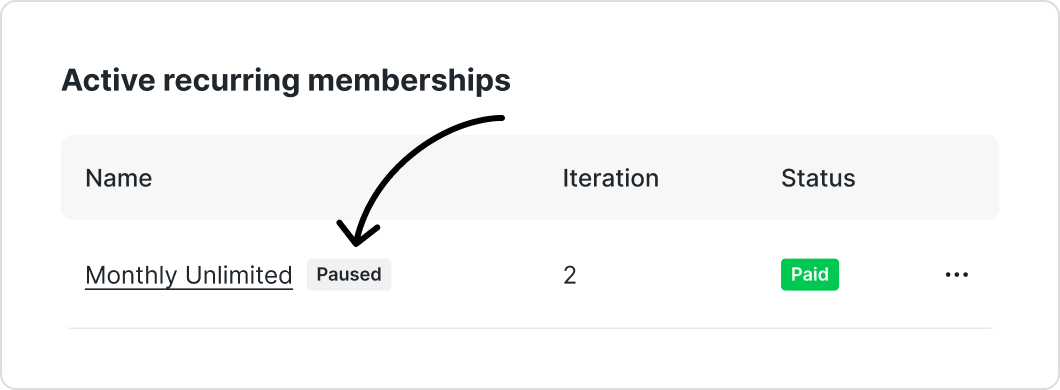
Tip: Currently, there isn’t a way to filter or view all paused memberships in one place. We plan to enhance this feature in the future. In the meantime, we recommend keeping a personal record of yogis with paused memberships for easy tracking.
The yogi can see that their membership is paused on their My bookings and orders page. Here, they’ll see the membership is marked as Paused. The yogi will also be informed that their membership is paused when they try to book a class.

Was this article helpful?
That’s Great!
Thank you for your feedback
Sorry! We couldn't be helpful
Thank you for your feedback
Feedback sent
We appreciate your effort and will try to fix the article