Editing a recurring membership
In this article
- Editing the iterations of a recurring membership
- Starting a recurring membership on the first of the month
- Editing the price of a recurring membership
Recurring memberships are only available on selected Momoyoga pricing plans. For more information on how recurring memberships work, please see this article on this topic.
Editing the iterations of a recurring membership
Each monthly renewal of a recurring membership is called an iteration. As the validity period of a recurring membership is one month, a new iteration is created each month. For example, if a yogi buys a recurring membership on the 10th, the validity period is one month until the 9th of the following month, with a new iteration being created on the 10th. With each new iteration, the number of credits resets and the yogi is able to use the associated amount of credits to book classes during the following month.
A studio can make changes to the start and end dates of an iteration for a specific yogi. This changes the date when the renewal of the membership is scheduled and applies to all following iterations.
Note: When editing an iteration, please make sure that the validity period does not exceed one month and that there is no gap between the end date of one iteration and the start date of the next.
Editing the start date
Follow these steps to make such changes to the start date of an iteration:
- Search for the name of the yogi whose recurring membership you would like to edit on your Yogis page
- Select the recurring membership in question under Active recurring memberships
- Select Edit next iteration date
- Enter the date when you wish for the membership to be renewed
- Click on Save
When following these steps, you can make adjustments to the start date of the next iteration of that yogi's recurring membership.
Editing the end date
If you would like to edit the end date of the current iteration, follow these steps:
- Search for the name of the yogi whose recurring membership you would like to edit on your Yogis page
- Select the recurring membership in question under Active recurring memberships
- Click on the pencil icon next to the current iteration under Repetitions
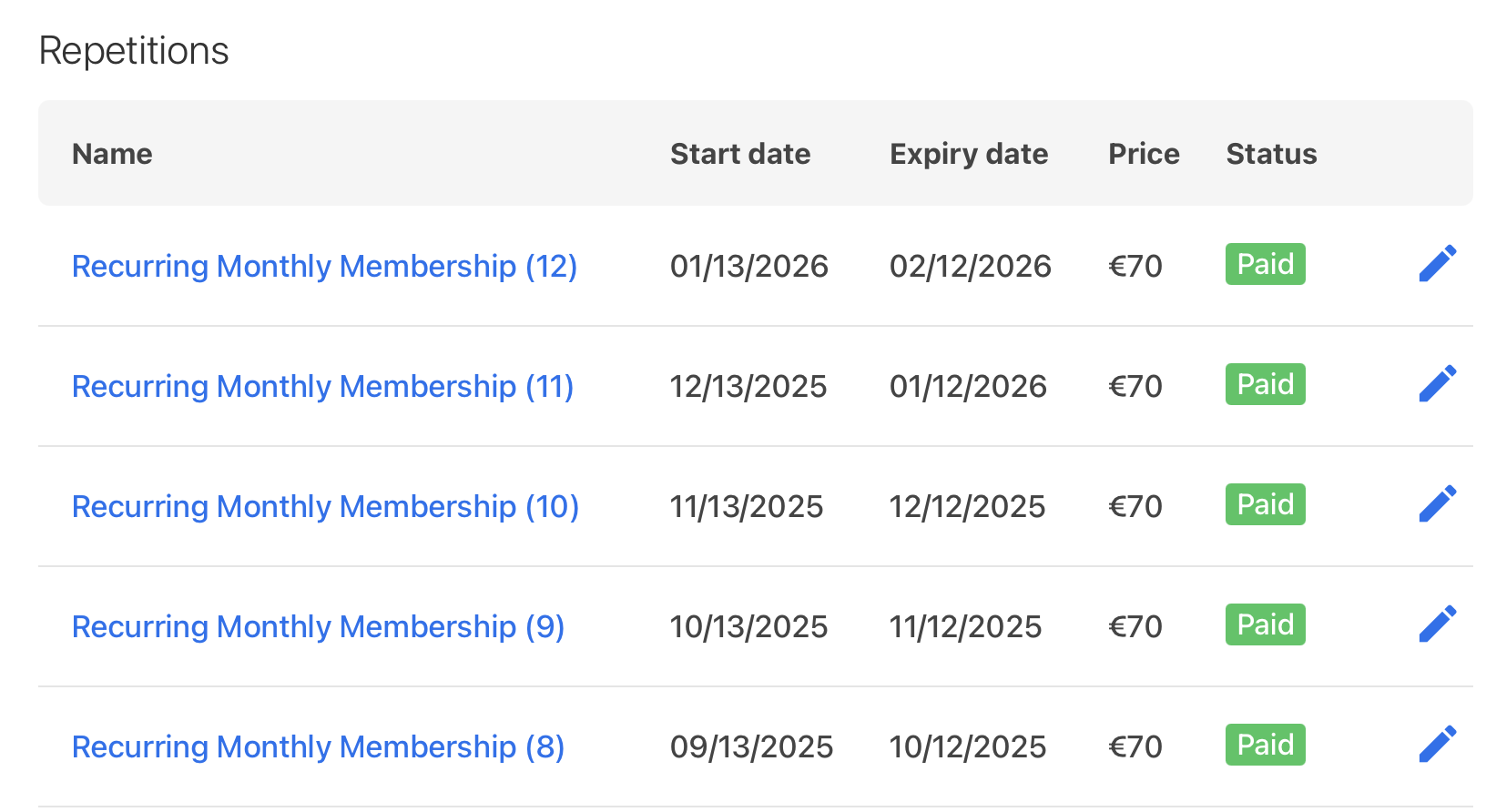
- Make the necessary changes to the start and expiry date of this iteration
- Click on Save
Tip: The current iteration is always at the top of the list with the highest number written next to it in brackets.
Starting a recurring membership on the first of the month
If you wish to set the start date of the recurring membership to the first day of the month, you can do so in one of two ways. Your yogi can either select the first of the month as the start date when purchasing the membership or you can edit the start date yourself. However, it is unfortunately not possible to create a recurring membership which always starts on the first of the month without making manual changes to the start date after or upon purchase.
Note: Your yogis will not be able to use the credits to book classes until the start of the month, as this is when the recurring membership becomes active.
From the yogi side
Yogis can always choose when they wish for the validity period of their purchased pricing option to start. This applies to recurring memberships as well, which then renew on the first of each month automatically. Your yogis can follow these steps to change the start date while purchasing their recurring membership:
- Select Buy now for the recurring membership in question on your studio's pricing page
- They will be forwarded to Confirm and pay for their chosen pricing option
- On this page, set the Start date of the recurring membership to the first of the following month
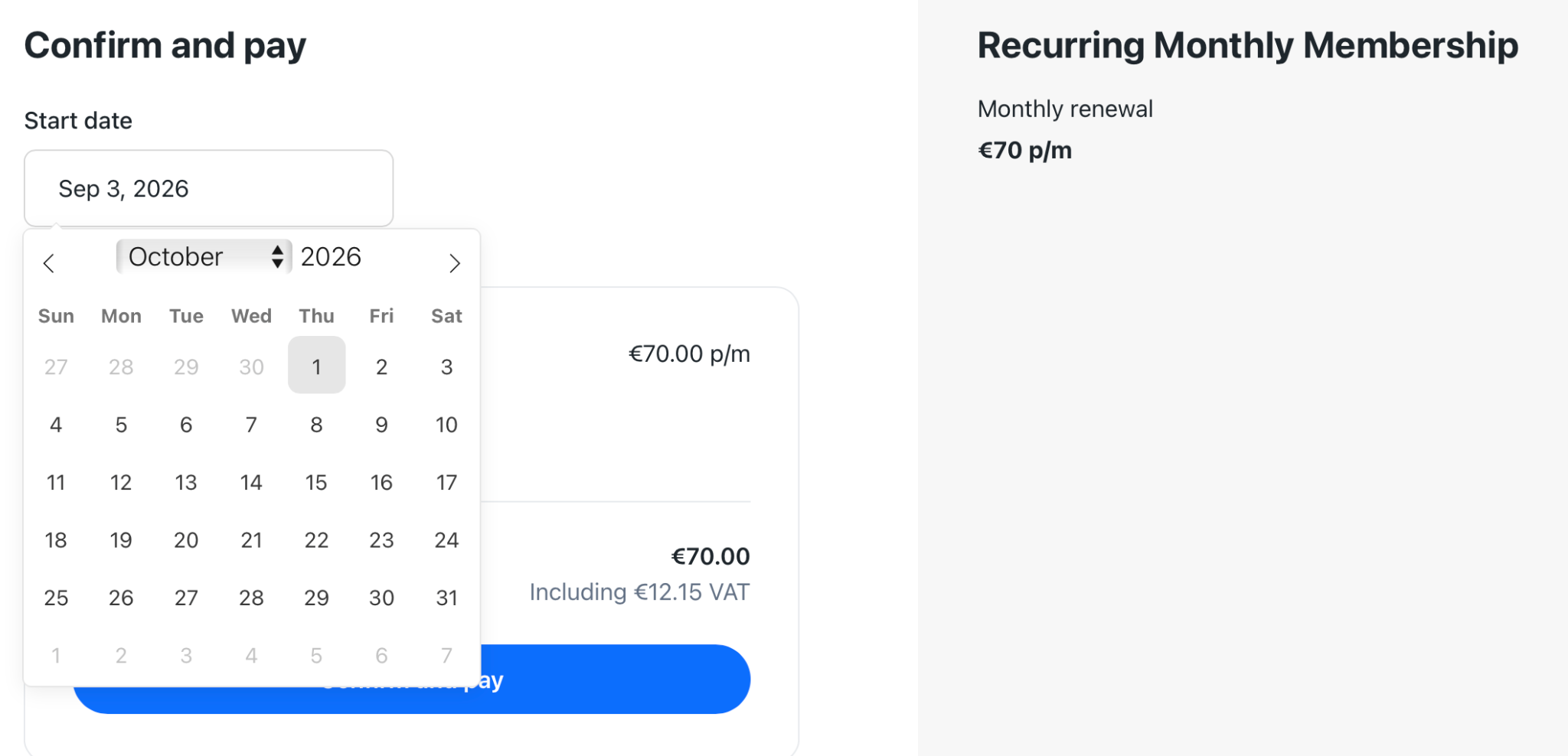
- Click on Confirm and pay and follow the instructions on the screen to pay
From the studio side
As a studio admin, you can also edit the start date of each iteration of the recurring membership to start on the first of each month. To do so, you can follow the steps outlined above under Editing the start date.
Then, as your yogi has already paid, we recommend that you assign them a temporary class pass to bridge the gap until the first iteration begins. You can create a class pass which has a similar name to your recurring membership, hide it from your yogis, and assign it until the start date of the recurring membership. Follow these steps to create such a class pass:
- Go to your Pricing page and select Add class pass
- Fill in all the required fields. When assigning a certain number of credits, we recommend assigning the same amount as the recurring membership allows for each month
- Deselect the option This class pass is visible on your pricing page
- Click on Save

Tip: As this class pass is used to bridge the gap until the recurring membership begins and your yogis therefore don't have to pay for it, you can leave the price box empty to make the class pass free.
To assign this hidden class pass to your yogis and edit the validity period to end when the recurring membership begins, follow these steps:
- Go to your Yogi page and select the yogi in question
- Select Add pricing option
- Click Add now next to the class pass you would like to assign
- Click on Add pricing option
- Return to the profile of that yogi and select the newly added class pass
- Click on Edit order
- Change the Expiry date to the same day as the start date of the recurring membership
- Click on Save
By following these steps, you will ensure that the recurring membership of your yogi starts and renews on the first date of each month. You will additionally have assigned them a class pass to allow them to book classes in the period between the date of purchase and the first of the next month, when the recurring membership will become active!
Editing the price of a recurring membership
In addition to adjusting the start or end date of an iteration for a specific yogi, it is also possible to edit the price of the recurring membership. This change will be applicable to all yogis who already purchased the recurring membership and to new purchases. To do so, you can follow these steps:
- Go to your Pricing page and select the recurring membership in question
- In the box for Price, adjust the amount
- Click on Save
With these changes, all yogis who have already bought the recurring membership will pay the new price upon the renewal of the membership. Yogis who are purchasing the recurring membership for the first time will see the adjusted price on your pricing page.
Tip: These same steps can be followed to adjust the price of a regular membership or class pass after it has been created, with the difference that it will only be applicable to new purchases.
Was this article helpful?
That’s Great!
Thank you for your feedback
Sorry! We couldn't be helpful
Thank you for your feedback
Feedback sent
We appreciate your effort and will try to fix the article