A yogi creating an account
In this article
- How do I introduce Momoyoga to my yogis?
- How can a yogi create an account?
- How do I know if a new student account has been created?
- How can I support my yogis during the onboarding process?
How do I introduce Momoyoga to my yogis?
Introducing your yogis to Momoyoga can feel like a big step and it is. That’s why clear communication is key. To help, we’ve created an example email you can copy, edit, and share with your yogis.
Some teachers send it by email, others post on social media, and many use platforms like MailChimp. While sending an introduction email is optional, it’s a great way to explain the new booking process, set expectations, and ensure your yogis are informed.
Example of communication to share with your yogis
Dear yogi,
Thank you so much for being part of this community and for attending my classes.
I feel so fortunate to share the practice of yoga with you.
We have signed up with a new booking system called Momoyoga.
For you, this means:
- Quick and easy class booking from anywhere, anytime.
- Instant confirmation so you never miss your favorite class.
- Better visibility of available classes and spots.
- Smooth, hassle-free cancellations or changes if your plans change.
For me, Momoyoga helps with studio administration, giving me more time to focus on teaching and running the studio, so I can continue providing you with the best yoga experience possible.
I will start using Momoyoga from (DATE) onwards. Before then, you will receive a welcome email that will guide you through the process of setting up your yogi account. When you have created an account, you can get started with booking classes right away.
Before then, you can prepare by downloading the free Momoyoga app, which you can find in the Play Store or App Store.
If you have any questions, feel free to contact me via: XX
Wishing you all good things,
Name: XX
Studio: XX
Note: Editing e-mails is possible with Momoyoga's paid plans.
How to share the registration link
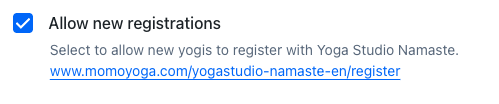
You can add your registration link to your website or social media and label it, for example, “Register” or “New Member Sign-Up.”
To find your registration link, follow these steps:
- Go to Settings
- Click Schedule
- Underneath Allow new registrations you can find your own personal link of your studio
How can you block new registrations?
It is possible to (temporary) restrict new yogis from registering with your yoga studio. This setting can be reversed at any time. To restrict new yogis from registering:
- Go Settings
- Click Schedule
- Uncheck Allow new registrations
- Click Save
New registrations are now prohibited.
How can a yogi create an account?
A yogi can create an account either by using your registration link or by signing up directly on your Momoyoga page. To register, they can click Register in the top-right menu or select the Book now button next to the class they’d like to join.
How do I know if a new student account has been created?
When a yogi creates a new account, you will be notified through the following options:
Home page
On the home page, you can see the latest yogi registrations, as shown below.
Yogi list
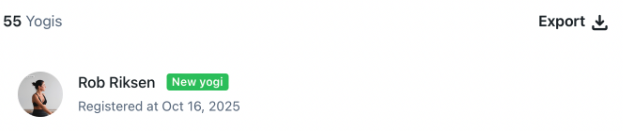
You can also view new accounts on the Yogis page, where they are marked with a New Yogi label. New yogis attending a class for the first time will have a First Visit label within the class overview.
E-mail notification
As an admin you can choose to receive an email each time a new yogi registers at your studio.
How can I support my yogis during the onboarding process?
We’ve made it easy for you by creating a step-by-step guide. After inviting your yogis to Momoyoga, you can share this guide with them to help them get started, manage their account and book classes.
That’s it! know you can successfully sign up a new yogi :)
Was this article helpful?
That’s Great!
Thank you for your feedback
Sorry! We couldn't be helpful
Thank you for your feedback
Feedback sent
We appreciate your effort and will try to fix the article